

Free QR menu options for UK restaurants
Already have a public menu link or PDF? Use the free QR code generator to preview a code for your tables and request a printable copy by email.
Want a menu hosted by TheWebXperience? You can create a standard account and check the menu and publishing options available in your dashboard.
The new Free publishing flow and the Starter menu preparation trial are not currently available in the UK.
Give guests a link they can open at the table
A café can link to its breakfast menu and a pub can share its drinks list. Guests open the public link in their browser. Keep a printed copy or ask your team to help guests who prefer to read the menu another way.
What you can use today
Get started
- Standard account registration
- Create an account and follow the regular setup.
- Existing Free accounts
- Check your dashboard for the publishing options and limits that apply to your account.
- Sample menu
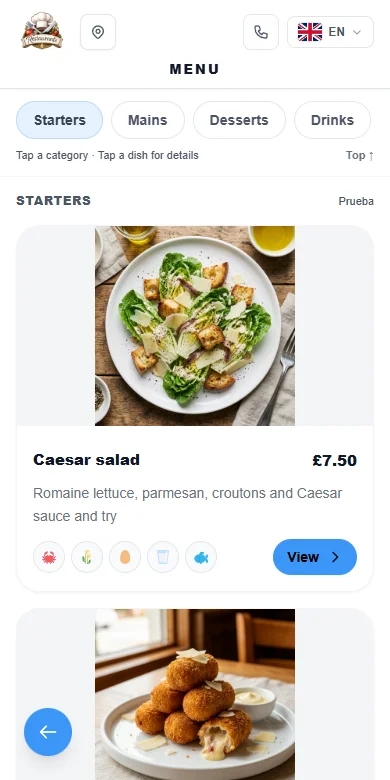
- Open the example menu to see how a published menu works on a mobile.
Manage menu content
- Menu details
- Organise your dishes and drinks in the dashboard.
- Guest view
- Check the public menu link before sharing it.
- Menu changes
- Check what you can update and publish in your account.
Share it with guests
- Menu languages
- Your account shows the language options available to you.
- QR code generator
- Preview a QR code for a public menu URL or a PDF link, then request the image by email if you want a printable copy.
Choose the QR generator if you already have a menu link. If you want to prepare and host a menu in TheWebXperience, use the standard account route or ask us what is available for your venue.
The registration form currently opens in Spanish.
Availability of the new Free plan
The new flow to review a privately prepared menu and choose Free before publishing is still awaiting launch for UK venues. The standard registration route remains available.
Already have a Free account?
Check your dashboard first. If you have a question about publishing, languages or your existing QR code, tell us what you want to change.
Make a QR code for your existing menu
Find your public menu link
Use a page on your website or a PDF link that guests can open without signing in. Check it on a mobile.
Generate and preview the code
Paste the full menu address into the free QR generator. Check that the preview points to your menu, then request the image by email for printing.
Scan a test print
Test it at the size and distance guests will use. Check both venue Wi-Fi and mobile data.
Keep the QR when your menu changes
Each printed code points to a specific address. If that address stays available when you update the menu or replace the PDF, the same QR code can still open it.
Free QR code generator
Preview a QR code for a public menu URL or a PDF link, then request the image by email if you want a printable copy.
Looking for the Starter trial?
The campaign that prepares a first menu for the Starter trial is currently unavailable in the UK. Ask us about current options if you want help getting your menu online.
Questions about Free and QR codes
Get the right option for your menu
Use your existing menu link to make a QR code, or ask us about publishing a hosted menu for your venue.