

Skip to content

Digital menu or PDF: which suits your restaurant?

Your menu needs to work for the guests reading it and the team keeping it up to date. A PDF may be enough if it changes rarely and reads well on a phone. A web menu may help when you regularly change dishes, manage several languages or need clearer navigation.

Compare the formats with your restaurant's day-to-day service in mind.

Open the PDF menuPDF
View the digital menuWEB
The sample PDF and web menu open in English.

What matters is the menu behind the QR code

A QR code can open either a PDF or a web page. The difference is how the content is presented and how your team maintains it.

A PDF menu is a document you can share and print with a consistent layout. A managed web menu presents content in a browser and provides the editing tools supported by its platform.

A PDF is digital too. In this comparison, “digital menu” refers to a managed web menu so the distinction is clear.

Digital menu and PDF: a practical comparison

Digital menu and PDF: a practical comparison
What to comparePDF menuWeb-based digital menu
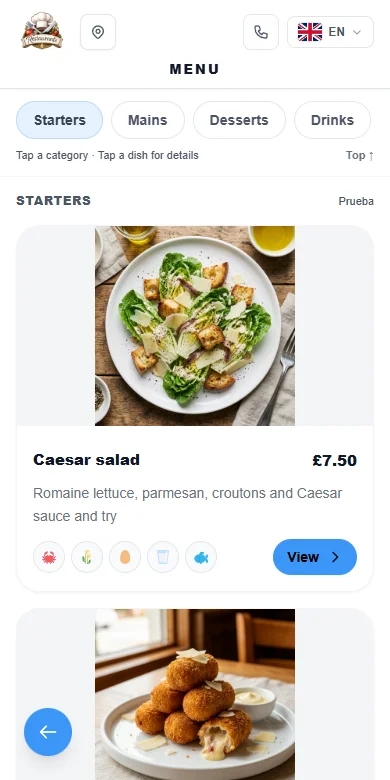
Reading on a phoneDepends on the layout and viewer; a print layout may require zooming.Can adapt content and navigation to the screen when developed well.
NavigationMay include an index, links and searchable text.May provide categories, search and filters.
LanguagesCombine translations or maintain separate documents.Manage language versions according to platform features.
Food informationInclude it and revise the document when necessary.Organise it by dish and keep it reviewed.
PhotographsPrepare images to keep the file size appropriate.Optimise images and their loading on the page.

Features differ between platforms and plans. Check the ones you need before choosing a service.

When a PDF may be enough

A well-prepared PDF can suit a venue with a fairly stable menu, comfortable phone reading and a straightforward updating process. It is also useful when you want to preserve a particular print layout or send a document.

Create a QR code for my PDF menu
When to consider a digital menu

A web menu is worth exploring when you need to:

  • Change dishes or availability regularly.
  • Help guests find their way through several sections.
  • Keep different language versions organised.
  • Show information by dish or offer specific browsing features.
  • Coordinate updates across your team.

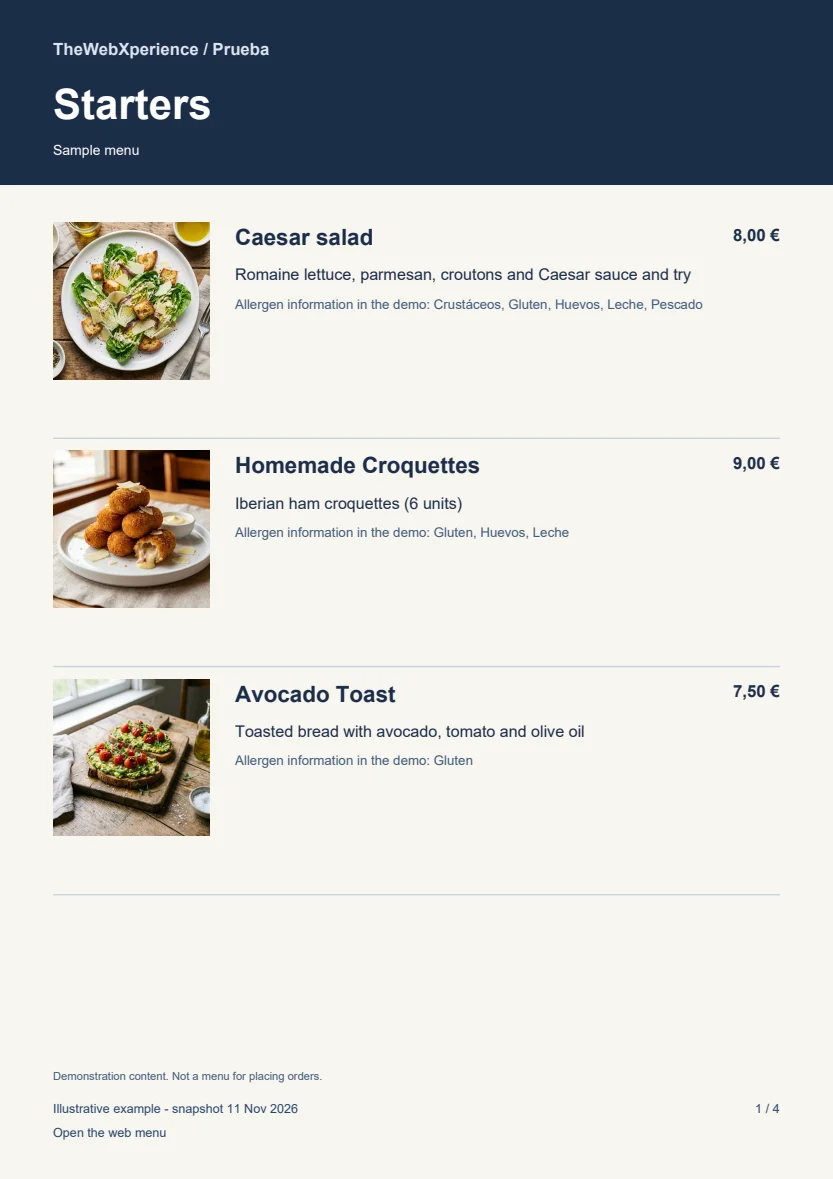
Try the same menu as a PDF and a web page

Open both versions of this sample on your phone. Find a dessert, read a dish description and return to the drinks section. Compare how the information reads and how easily you move around.

Illustrative example showing the same content in two formats. It does not show measured results from a customer venue.

PDF prepared from the demo on 11 November 2026. It preserves the sample dishes, photos, prices and allergen information; the web menu may change. This is not an automatic product export.

The sample PDF and web menu open in English.

Scan to open the web menu

How to move from a PDF to a digital menu

  1. Gather your current menu content

    Prepare the latest PDF, original files and photographs you have permission to use. Check which categories and dishes should appear.

  2. Add the content and check it

    Follow the platform's actual process: manual entry, import or assisted setup. If automatic recognition is used, check dish names, descriptions, prices and food information. Importing a file does not remove the need to review it.

  3. Review the menu on a phone

    Check navigation, photographs, links and every language you plan to publish. Make sure guests can find the right information.

  4. Check your printed QR codes

    You can retain them if you keep the same address or control a redirect. A code pointing to an address you cannot control or redirect will need replacing.

  5. Decide how each version will be maintained

    Assign responsibility for web updates and for checking PDFs and printed copies. A new format does not take the place of a clear process.

Open the PDF menu

Printed menus can remain part of your service

Paper can still help guests who prefer it or cannot use a phone. If you offer both formats, keep their information consistent.

Some platforms provide PDF exports; others need a separate process. Check how you will produce the printed version before choosing a tool. Changes made online do not update copies already on the tables.

Update your menu, keep your QR

Frequently asked questions

Choose with your next menu change in mind

Think about what you would update, who would do it and how guests would see the result. Explore TheWebXperience and check whether its available features suit those tasks.